Google Kubernetes Engine: Qwik Start(GSP100)

Google Kubernetes Engine (GKE)

4
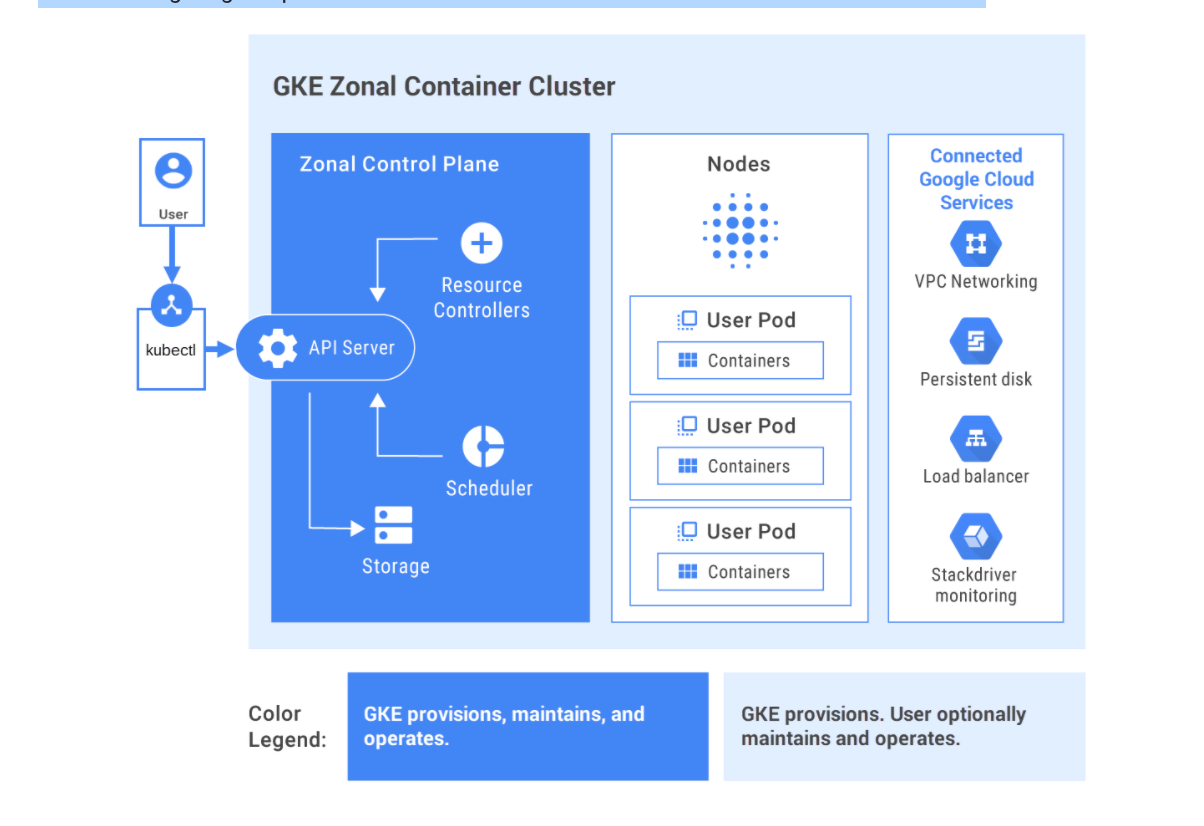
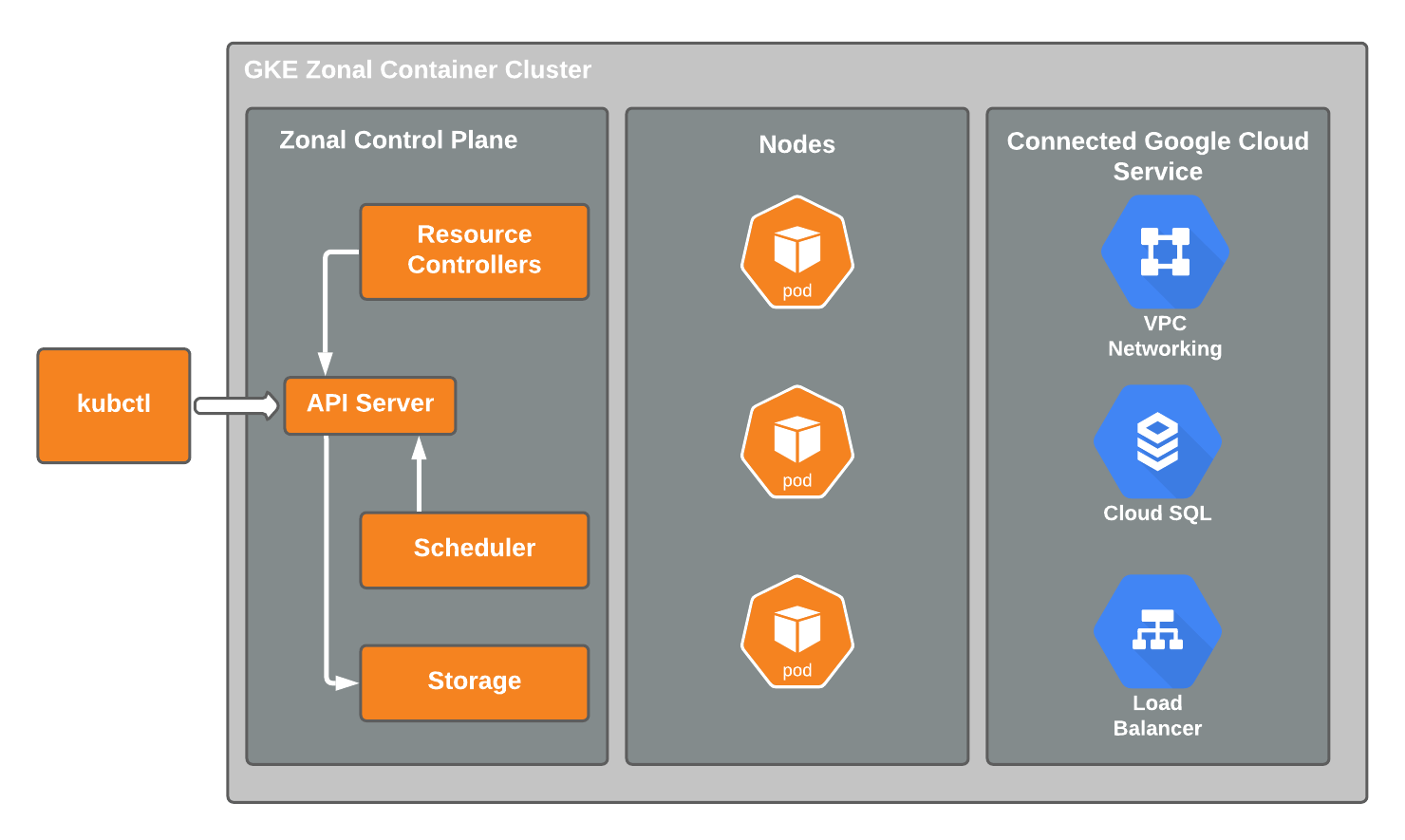
Google Kubernetes Engine (GKE) is a managed Kubernetes service provided by Google Cloud that allows you to deploy, manage, and scale containerized applications easily.
Instead of managing servers manually, GKE automatically manages:
Cluster infrastructure
Kubernetes control plane
Node management
Auto scaling
Monitoring
Key Components of GKE
| Component | Description |
|---|---|
| Cluster | Group of machines running Kubernetes |
| Node | VM instance running containers |
| Pod | Smallest deployable unit containing containers |
| Deployment | Manages application replicas |
| Service | Exposes application to network |
| Load Balancer | Distributes traffic across pods |
Kubernetes Architecture Explained
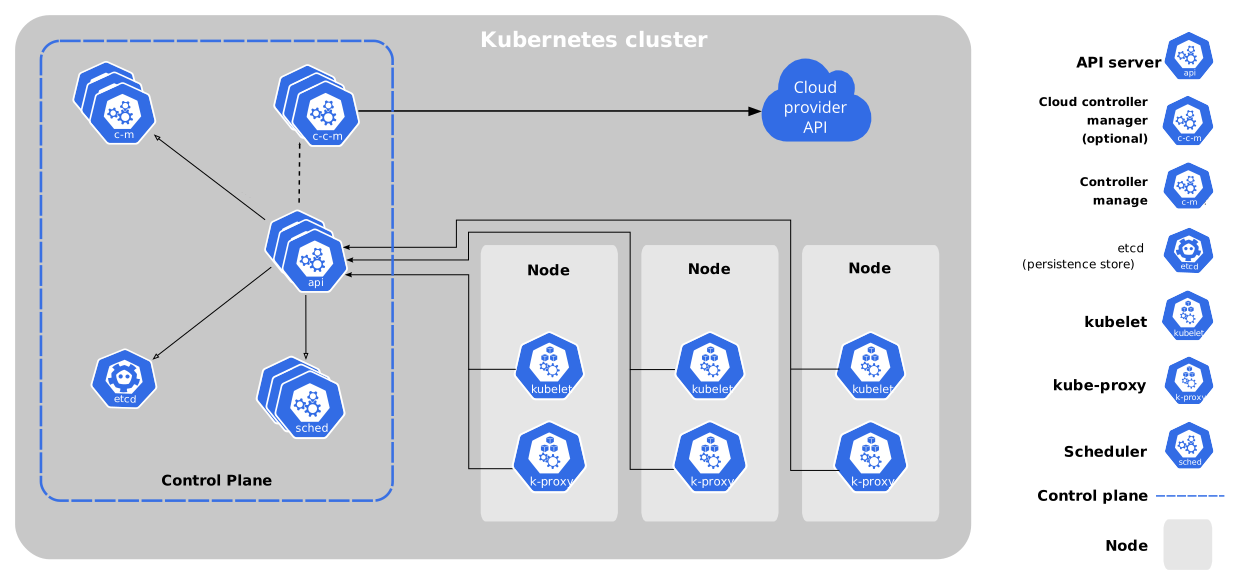
Kubernetes Cluster Structure


4
Control Plane (Master)
Manages the cluster.
Main components:
API Server – Entry point for commands
Scheduler – Assigns pods to nodes
Controller Manager – Maintains system state
Worker Nodes
Machines where containers run.
Node contains:
Kubelet – Communicates with master
Container Runtime – Runs containers
Pods – Application containers
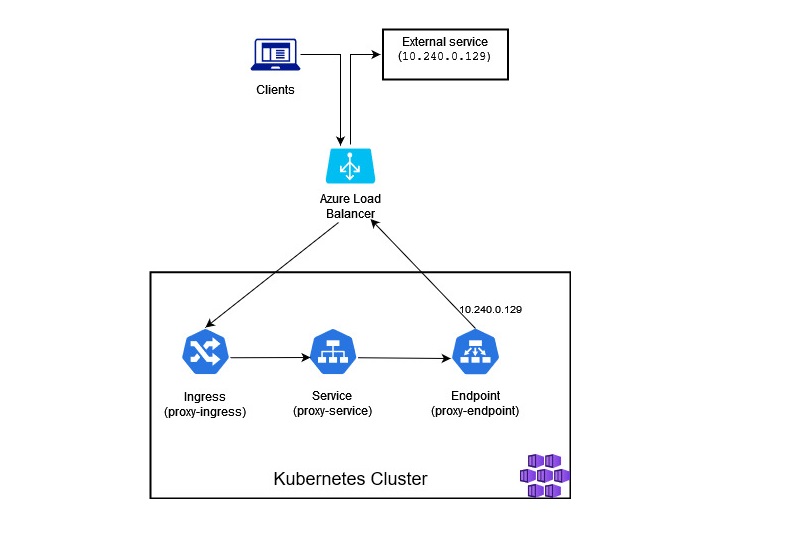
Lab Architecture
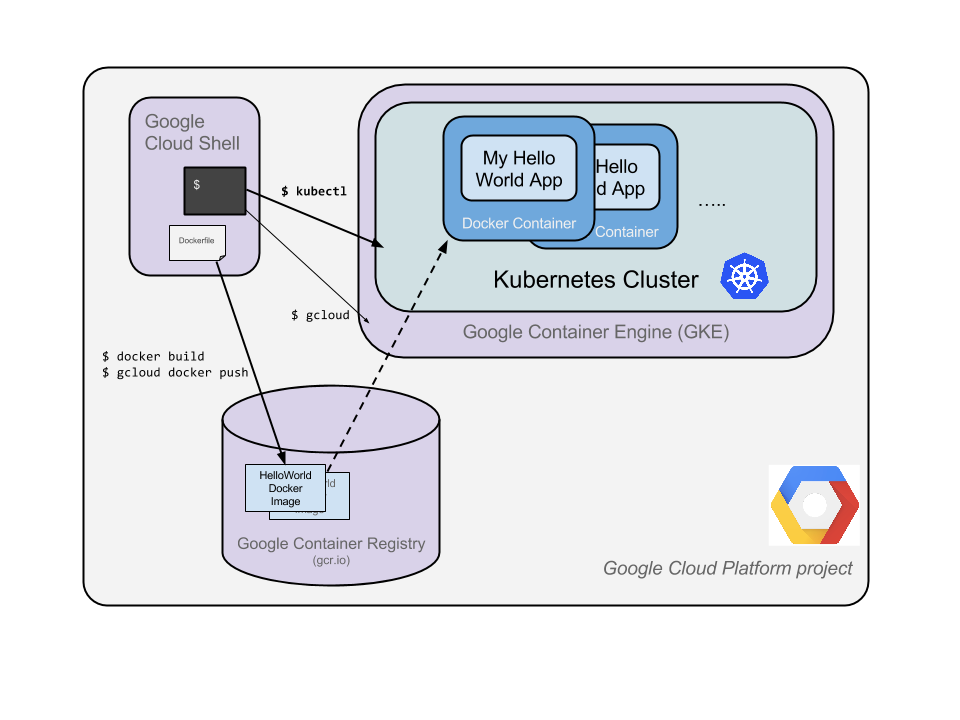
4
Workflow:
1️⃣ Create GKE Cluster
2️⃣ Deploy hello-app container
3️⃣ Create LoadBalancer service
4️⃣ Access via external IP
Lab Practical Steps (Command Line)
Step 1: Activate Cloud Shell
Open Cloud Shell in the Google Cloud Console.
Cloud Shell is a virtual machine with tools like:
gcloudkubectldocker
Step 2: Set Default Region and Zone
gcloud config set compute/region us-east1
gcloud config set compute/zone us-east1-d
Explanation
Region → geographical area
Zone → data center location inside region
Example
us-east1 → Region
us-east1-d → Zone
Create a GKE Cluster
gcloud container clusters create --machine-type=e2-medium --zone=us-east1-d lab-cluster
Explanation
| Parameter | Meaning |
|---|---|
gcloud container clusters create |
Create Kubernetes cluster |
--machine-type=e2-medium |
VM instance type |
--zone |
Cluster location |
lab-cluster |
Cluster name |
Output Example
NAME: lab-cluster
LOCATION: us-east1-d
NODE VERSION: 1.22
NUM NODES: 3
STATUS: RUNNING
The cluster now contains:
1 Control plane
3 Worker nodes
Authenticate with the Cluster
gcloud container clusters get-credentials lab-cluster
Explanation
This command:
Downloads cluster credentials
Configures
kubectlAllows communication with the cluster
Output example:
kubeconfig entry generated for lab-cluster
Deploy an Application
kubectl create deployment hello-server --image=gcr.io/google-samples/hello-app:1.0
Explanation
| Part | Meaning |
|---|---|
kubectl |
Kubernetes CLI tool |
create deployment |
Create application deployment |
hello-server |
Deployment name |
--image |
Container image |
Image used:
gcr.io/google-samples/hello-app:1.0
This creates:
Deployment
Pods
Running containers
Expose the Application
kubectl expose deployment hello-server --type=LoadBalancer --port 8080
Explanation
| Parameter | Meaning |
|---|---|
expose |
Creates service |
--type=LoadBalancer |
Creates external load balancer |
--port 8080 |
Application port |
View Service
kubectl get service
Example output:
NAME           TYPE           CLUSTER-IP     EXTERNAL-IP     PORT
hello-server   LoadBalancer   10.39.244.36   35.202.234.26   8080
Explanation
| Field | Meaning |
|---|---|
| CLUSTER-IP | Internal IP |
| EXTERNAL-IP | Public IP |
| PORT | Application port |
Access Application
Open browser:
http://EXTERNAL-IP:8080
Example:
http://35.202.234.26:8080
Output:
Hello World
Version 1.0
Hostname: hello-server
12. Delete the Cluster
gcloud container clusters delete lab-cluster
Confirm:
Y
Why Delete?
Avoid resource usage
Prevent cloud costs
Clean environment
Important Kubernetes Commands (Exam Notes)
| Command | Use |
|---|---|
kubectl get pods |
View running pods |
kubectl get services |
View services |
kubectl get deployments |
View deployments |
kubectl describe pod |
Detailed pod info |
kubectl delete pod |
Delete pod |
Key Features of GKE
✔ Automatic scaling
✔ Load balancing
✔ Rolling updates
✔ Self-healing nodes
✔ Monitoring with Cloud Monitoring
✔ Automatic upgrades
Advantages of Using GKE
| Feature | Benefit |
|---|---|
| Managed Kubernetes | No infrastructure management |
| Auto Scaling | Handles traffic automatically |
| High Availability | Reliable applications |
| Container Orchestration | Efficient container management |
✅ Lab Summary
In this lab you learned:
How to create a Kubernetes cluster in GKE
How to deploy containerized applications
How to expose applications using services
How to access applications via external IP
How to delete the cluster